

For the person recording
Open. Pick. Record.
Choose a screen, camera and microphone, then press record. No scenes, sources or encoders to understand first.
Free forever. No account needed.
A native Mac recorder for screen and camera. One take, with the cursor, and three separate synchronized files when you stop.
macOS 13+ · Apple silicon · Free and open source
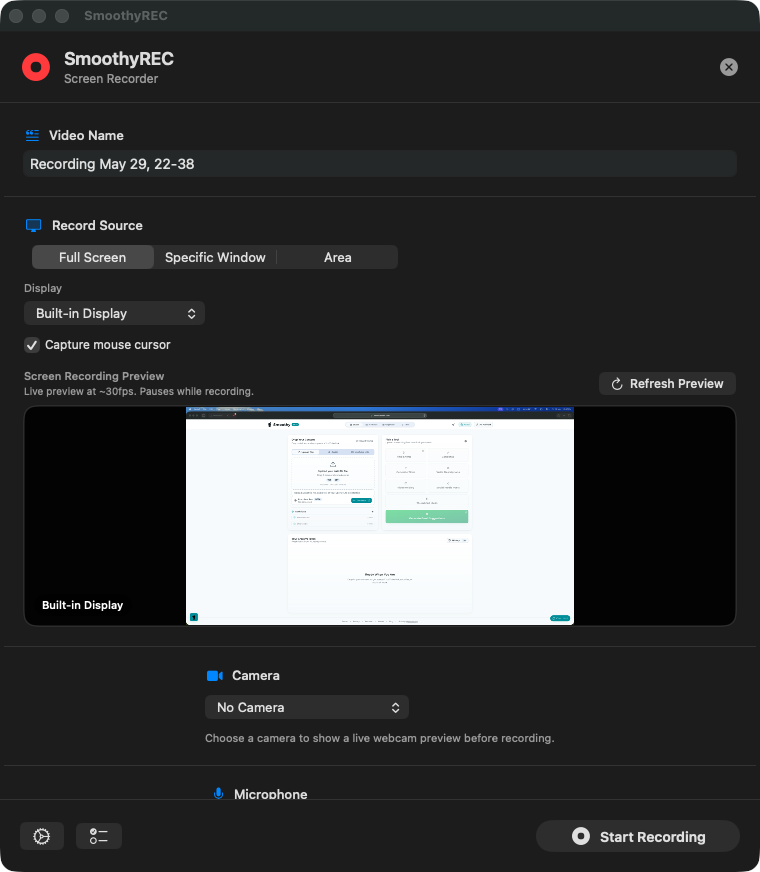
The recorder window, and the three files it leaves behind.
The missing middle
Ask someone to record a walkthrough and the tool decides what comes back: a setup lesson, a flattened file or an upload link. SmoothyREC is built for the handoff.
For the person recording
Choose a screen, camera and microphone, then press record. No scenes, sources or encoders to understand first.
For the person editing
Screen, camera and mic arrive as separate, synchronized files. Reframe, re-time or replace any of them.
For the Mac
SwiftUI and ScreenCaptureKit. A small app that records locally, without an Electron shell or an upload step.
The editor-friendly part
The screen, camera and microphone start on one shared clock and land in one folder. They stay separate, so the edit can still make decisions.
A whole display, one window or a drawn-out area, with system audio if you need it.
Built-in, USB or iPhone. A clean angle that is never composited into the screen.
An isolated voice track with live levels and input gain before you roll.
Need one share-ready file too? Export a combined version alongside the originals.
Standard files for Premiere Pro, Final Cut Pro, DaVinci Resolve or SmoothyEdit. One named folder per recording.
All three start on the same frame.
The controls
Everything here exists to prevent a restart, not to fill a settings panel.
A whole display, one window or a drawn-out area. The preview shows exactly what will be captured.
Every click and movement stays in the screen recording when a walkthrough depends on it.
Built-in, USB or an iPhone through Continuity Camera. The camera records as its own file.
Take a breath, rearrange the screen and keep going in the same take.
A live mic meter and input gain catch a quiet or clipping take before you start.
720p to 4K, 24, 30 or 60 fps, with an optional countdown before recording begins.
Start, stop and pause from the menu bar or with global shortcuts, even with the window closed.
Screen, camera and mic land together, named and ready to send. No exports to hunt down.
Native by design
SmoothyREC uses Apple's own capture pipeline. No Electron shell, no web view and no upload queue, so the app stays out of the way while it records.
SwiftUI · ScreenCaptureKit · AVFoundation
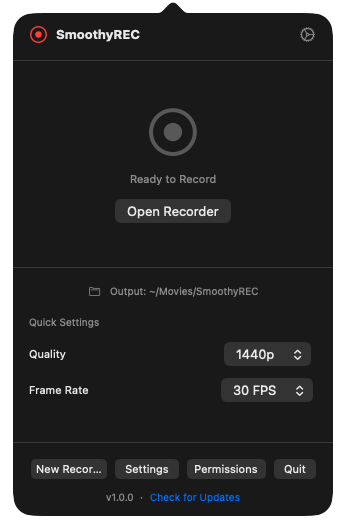
The whole recorder lives in the menu bar, with no project window to manage.
Why I made this
“I kept asking clients for a walkthrough, then spending the call teaching OBS. The alternatives flattened the camera into the screen or put the take behind a paywall. I wanted one app I could send without instructions, and files I could actually edit.”
So SmoothyREC records the screen, camera and mic together, keeps them apart, and gets out of the way. No scenes. No upload. No decisions baked in.
 AliEditor and maker of SmoothyEdit
From link to timeline
The client gets one clear button. The editor gets every source separately.
One DMG. No account, no trial, no setup call. The first launch explains the three macOS permissions in plain language.
Pick a display, window or area. Add a camera and mic, keep the cursor if it matters, then roll. Pause and resume from the menu bar.
A named folder with screen, camera and mic files, all starting on the same frame. Drop them on any timeline and cut.
⌃⌘R Start / stop ⌃⌘P Pause / resume Or use the menu bar
Questions
Still deciding? The app is free, local and small enough to try on the next handoff.
Ask on DiscordYes. By default SmoothyREC writes the screen, camera and microphone to their own files in one recording folder. You can also export an optional picture-in-picture version, but the separate originals are always kept.
Yes. Cursor capture is a simple on-or-off setting and works with full-screen, window and selected-area recordings.
Yes. SmoothyREC lists the cameras macOS provides, including an iPhone using Continuity Camera and an external USB webcam.
Yes. Pause from the recorder window or with ⌃⌘P. Resume when you are ready and the same take continues, with no second file to join later.
System audio can be included with the screen recording, while the microphone is written as its own track. A live level meter and input gain help you set the mic before recording.
No. SmoothyREC records locally, needs no account and does not upload your footage. It is free and open source under the MIT license.
Yes. Optional picture-in-picture export creates a single share-ready file in addition to the separate screen, camera and microphone files.
macOS 13 or later on an Apple silicon Mac. Download the DMG, drag SmoothyREC to Applications, and grant screen recording plus camera and microphone access if you use them.
Free for macOS
Download SmoothyREC, send it to your client, and get a folder you can drop straight onto a timeline.
screen.mp4 · camera.mov · mic.m4a macOS 13+ · Apple silicon · MIT licensed · No account